I made some authoring tools for creating SCORM 1.2 coding learning objects to use in Moodle. You can create various types of interactive hints and tests to help students understand what they are doing and whether they are successful.
I’ve been testing this as I go, and while I’m fairly happy with it, there are probably edge cases I’ve missed or dumb things I haven’t checked for. I’m in the process of writing up a bunch of Python problems to trial-by-fire it with my Year 9s next term. If you decide to use it and bugs fall out, please drop me a line.
Pre(r)amble
For the last couple of years I’ve been working in a remote teaching school teaching Digital Technologies, Maths, and also supporting staff with software and online pedagogy. I have a couple of other posts in the works about the school model, but this one isn’t about that.
My last job was about developing interactive learning material with the expectation that it would generally be used in a physical classroom. This one is about making the combination of synchronous video lessons and asynchronous LMS (Moodle) content work together for students who might be anywhere in the world.
As much as I like Moodle, and
have since I brought it into my first school almost 20 years ago, it doesn’t provide any good native tools
for interactive programming exercises. DoE WA’s Third Party Services policy makes it hard to use some
external services, even those that aren’t either busy rebranding themselves as primarily being about
AI, or trying to shepherd their learners into working for their corporate investors donors.
Somewhat obviously, this post is about making something to scratch my own itch.
SCORM
Let’s be honest, SCORM is a bit crap. But it’s the best tool for the job if I want to be able to get my students learning some of the practical content like programming inside the LMS, feeding grades back to the marks book, and generally not having to juggle more logins, rely on the kindness of strangers for progress tracking, and all that good stuff that I can already do in Moodle. Plus, it’s just code, and since I can throw a spec at some agents and go play with my kids, it felt like a tractable problem.
Now I have two new tools to help my students learn how to code, either in Blockly or in Python. Both let me design problems with varying levels of hand-holding and automated testing, and can export a plain JSON config to keep problems for later, preview the SCORM view, and export a SCORM 1.2 package to whack into Moodle.
Moodle only natively supports 1.2, which kinda sucks, but it feels like the self-contained principles only lasted so long before everyone threw it in and moved to hosted LTI stuff like xAPI. Sure it lets you have online libraries of packages and solves keeping them up to date, but the cynical part of me says it also makes them much easier to monetise.
The fun stuff
It was around a year ago that I was playing around with Clipy, and although I had a lot of fun learning about what agents were capable of at the time, it ended up not being amazingly successful at what I wanted it to do. Regardless, it did shake a fair few ideas out of my head about how to do feedback and testing (not all of which made it into these tools).
Visual test building
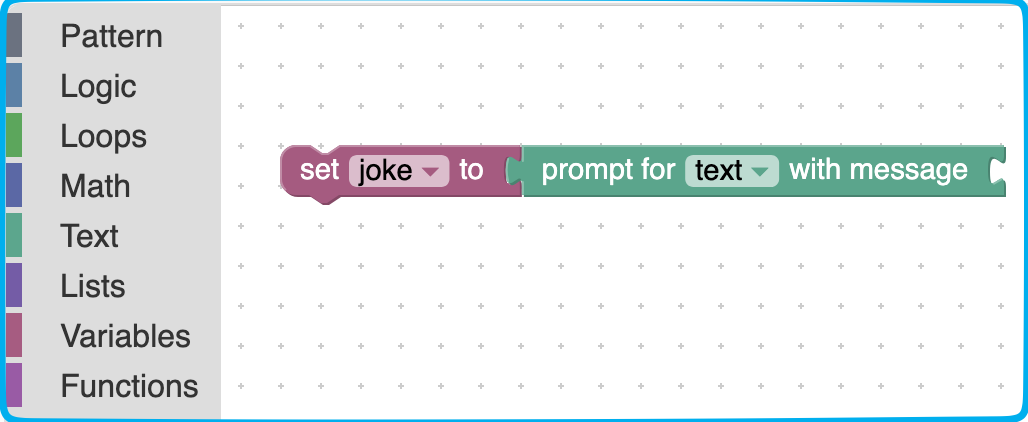
Initially I was just going to do IO tests and hints for the Blockly tool, but since Blockly is just XML under the hood, figured that testing block combinations through pattern matching would work ok too, but that’s also a giant pain since you need to know what blocks you’re testing for it.
After trying out putting auto-complete for block names in, it hit me that I already had a Blockly editor in the tool anyway, why not just use the editor to build the pattern visually, and forget about the whole “remembering block names” thing entirely.
This turned out pretty well, so now I could just snap some blocks together, treat that as the pattern to match, and use it for testing. Some options for enforcing matches of variable names, text or number values, etc made it more flexible still.
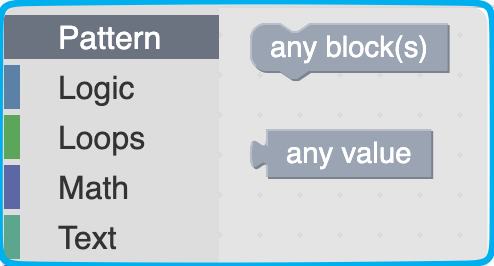
But what if there were multiple ways to achieve an outcome? Well, one method is just to have
AND/OR/NOT tests (which this has) and the other is to introduce pattern blocks, that can match
any blocks (or no blocks). Want to ensure the student has a print block somewhere in a loop
but there might be other blocks in there too? Stick a couple of pattern blocks in there.
What about Python?
I wanted to have the same flexibility for Python as with Blockly. I’m pretty comfortable with regular expressions (insofar as someone can get comfortable with being poked in the face with a cactus covered in lemon juice), but regex is pretty brittle. It’s there if you need it, but I wanted something better.
Putting Clipy together taught me that ASTs were actually pretty useful for this sort of thing, but the implementation there turned out to be overcomplicated. For this editor I ended up using the ideas from the Blockly visual test editor - just write the Python code, and use the AST to validate that the pattern was present in the student’s code. As a bonus, it has wildcards similar, but more powerful to those in the Blockly version.
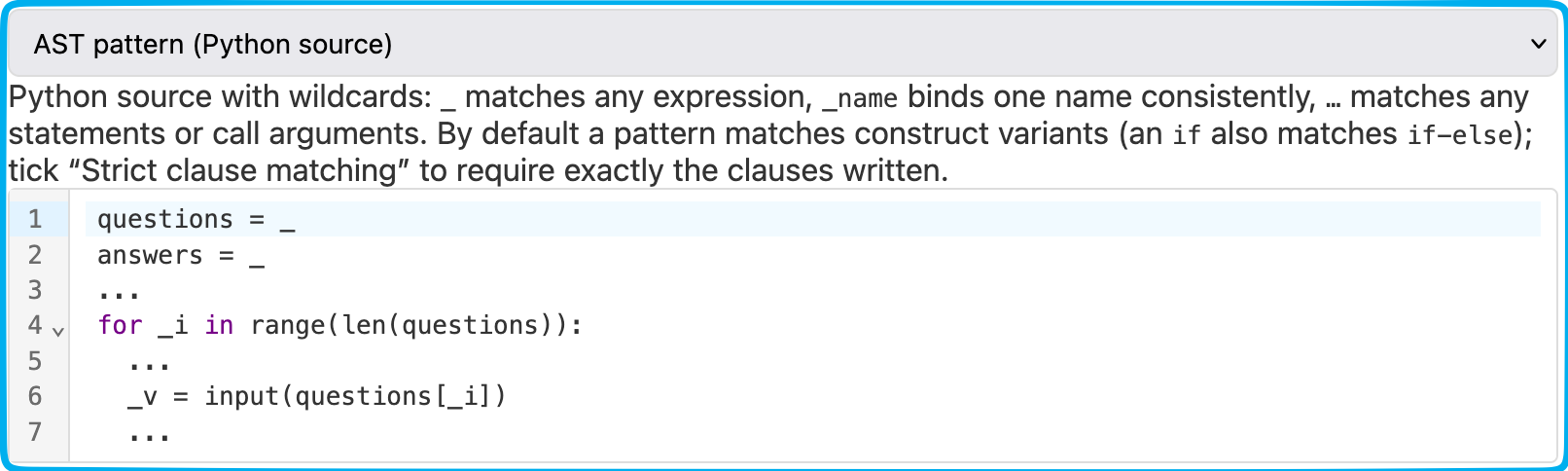
- Want to just check the basic structure? Use
_or...wildcards with the bits you care about. - Want to make sure they used a specific variable name? Specify it in your test code.
- Want them to use their own variable names, but that they’ve used them in the correct places? Bind a name in the test and use it in the place you want to check.
The warts
SCORM 1.2 and suspend_data
SCORM objects let you save student state so they can return to their attempt without having to do everything again, which is great. SCORM 1.2 has a limit on the state of around 4KB, which is less great if you’re storing anything complex like say, a bunch of Blockly XML.
For simple stuff, you can just shrink the program structure down and recompose it on restore, if you don’t mind losing all of the Blockly block ID strings (I certainly don’t mind that). However if you end up with complex things with lots of user text or lovingly expressive variable names you might need to throw things away.
Instead, I ended up cheating. If the suspend data fits in 4k (with some squishing) then fine, do that. If it doesn’t we replace it with a token and shove the data into browser storage instead. It’s a tradeoff, since if the student ends up on another computer they don’t get their save state back, but the intention is to make things which are a single session’s worth of work anyway.
AST and what’s really in the tree
In my somewhat naive “let’s just write Python code and match the tree” I wasn’t aware of what
lurked inside the tree when I wrote a set of incremental tests to check whether an if statement
had been constructed correctly with the right code in the right branches of the statement.
I checked the if and its condition, and everything was peachy, test passed. I added the else
clause to my student test code, and my previous test stopped working. Turns out it’s a different
type of node in the tree now. What’s more an if-elif is actually an if-else-if as well. So
much for keeping the tests simple.
What’s presented in the test authoring now is an (off by default) option for strict clause
matching, for when you really need to be sure of the structure (covering a bunch of the other
control structures like try-except, match, and options like finally). When the option
isn’t set, under the hood we check for different variants of the structure permissively, so the
sort of incremental feedback approach I was originally aiming for works.